
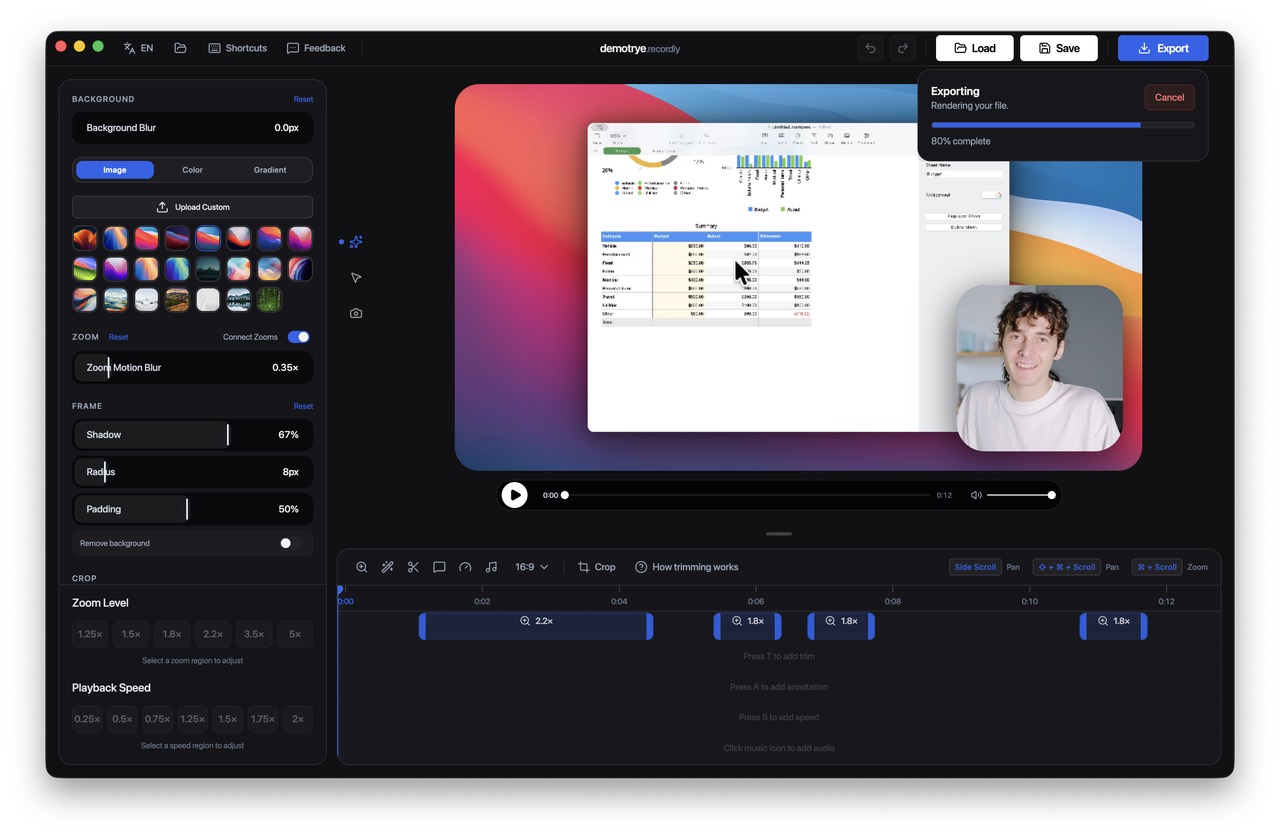
- Recordly is a free, MIT-licensed screen recorder and editor with 8,300+ stars on GitHub, replacing Screen Studio for $0.
- Ships every paid feature creators expect: Apple-style auto-zoom, cursor smoothing, motion blur, native ScreenCaptureKit capture, and a full timeline editor.
- Scene composition runs on PixiJS, with native Swift helpers handling macOS cursor telemetry on macOS 12.3 and later.
- Screen Studio charges a $229 one-time license for a single Mac. Recordly costs nothing on macOS, Windows, and Linux — forever.
Why Recordly Is Better Than Screen Studio
Screen Studio built its reputation on one trick — beautiful auto-zoom animations driven by cursor activity — and turned it into a $229 per-seat license, macOS only. For solo creators recording a few demos, that price stings; for agencies needing the app on multiple machines, it stacks fast. The lock-in is more subtle than enterprise SaaS, but it is real: the project files only open in Screen Studio, and once you commit a tutorial library to the format, switching costs are non-trivial.
Recordly ships the same feature set under an MIT license. Apple-style zoom animations with automatic suggestions from cursor activity, native ScreenCaptureKit recording on macOS 12.3 and later, cursor smoothing, motion blur, click bounce, macOS-style cursor assets, smooth pan transitions between zoom regions, timeline trim, speed ramps, annotations, manual zoom spans, wallpapers, gradients, padding, rounded corners, blur, drop shadows, MP4 and GIF export at any aspect ratio, and .recordly project files so you can reopen edits later. Free. Cross-platform. Source open.
Recordly vs Screen Studio: Features Compared
| Feature | Recordly | Screen Studio |
|---|---|---|
| Pricing | Free forever | $229 one-time license |
| Platforms | macOS, Windows, Linux | macOS only |
| Auto-zoom animations | Yes — cursor-driven | Yes — cursor-driven |
| Native macOS capture | ScreenCaptureKit | ScreenCaptureKit |
| Cursor smoothing & motion blur | Built-in | Built-in |
| Timeline editor | Trim, speed ramps, annotations | Trim, speed ramps, annotations |
| Backgrounds | Wallpapers, gradients, padding, blur | Wallpapers, gradients, padding, blur |
| Export formats | MP4, GIF, any aspect ratio | MP4, GIF, any aspect ratio |
| License | MIT | Proprietary |
Recordly is not for users who want a polished, hand-held setup with a glossy onboarding flow and dedicated support. It is for indie hackers, devtool founders, YouTubers, and engineers who want the same demo-quality output without paying $229 per machine. The math is simple — a five-person team would spend $1,145 on Screen Studio licenses and $0 on Recordly. The output is indistinguishable.
How to Get Started With Recordly
- Clone the repo from github.com/webadderall/Recordly or grab the latest release binary.
- On macOS 12.3 and later, grant Screen Recording permission so ScreenCaptureKit can capture your display.
- Record your screen — cursor telemetry is captured automatically by the native Swift helper.
- Open the recording in the editor; auto-zoom suggestions appear based on cursor activity.
- Adjust pan transitions, motion blur, padding, gradients, and drop shadows in the timeline.
- Export to MP4 or GIF at any aspect ratio, or save the
.recordlyproject file to reopen later.
Recordly has 8,300+ stars on GitHub, runs on macOS, Windows, and Linux, and is MIT licensed. Scene composition is built on PixiJS, with native Swift helpers handling macOS cursor telemetry. For more open-source creator tools, see our free open-source alternative to Vercel and our free open-source alternative to Salesforce.